

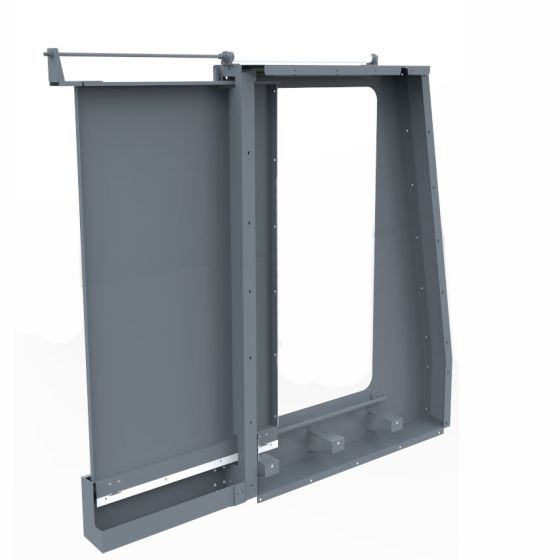


1100MX Robot Automation Enclosure Side Panel
Pneumatically Actuated Automatic Side Panel for 1100MX. Upgrade your machining process with automated access, reducing manual intervention and increasing efficiency in high-production environments.
This auto door replaces the right-side enclosure panel of the Tormach 1100MX and provides pneumatic actuation for automated access.
The door is driven by a pneumatic cylinder that slides the panel fully open, allowing unobstructed access to the machine from the right side for robot loading or other automation.
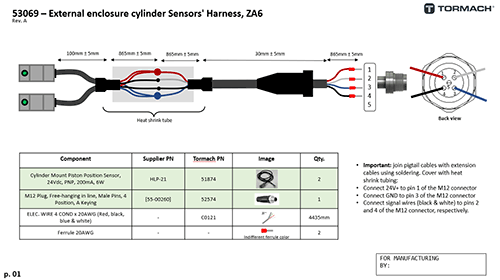
Two 24 VDC position sensors are mounted on the cylinder to indicate fully open and fully closed states. Sensor outputs are routed through a standard 4-pin M12 connector (desinged to match the Tormach ZA6 robot’s IO specification) for integration with external controls. To integrate these sensors with another, non-Tormach robot or automation product, refer to the wiring diagram and connection troubleshooting instructions below.
The system requires 90 psi compressed air. All pneumatic connections use push-to-connect fittings for 4 mm air tubing.
Specifications:
- Compatibility: Tormach 1100MX
- Mounting: Replaces right-side enclosure panel
- Actuation: Pneumatic cylinder, linear slide
- Position feedback: (2) 24 VDC sensors (open/closed)
- Electrical interface: 4-pin M12 connector
- Air supply: 90 psi
- Pneumatic fittings: Push-to-connect, 4 mm tubing
Wiring troublshooting instructions
Connect 24V+ to pin 1 of the M12 connector
Connect GND to pin 3 of the M12 connector
Move the sensor to the end of the cylinder. The cylinder piston is magnetic and should cause the green LED on the sensor to illuminate.
Check Pins 2 and 4 on the M12 connector. One of these pins should show 24VDC when the corresponding sensor is active.
Explore manuals, videos, FAQs and more for Tormach machines and accessories.
Support Center